
How to Use Our Agoda Discount Codes (Step-by-Step Guide)

Planning your next trip? Here’s a simple guide on how you can use our Agoda discount codes and save on your bookings.
Whether you’re booking hotels, resorts, tours, attractions, or activities, these promo codes can help you get extra discounts for your next adventure.
Agoda Discount Codes

🏨 Hotel & Resort Bookings
Code: PVAGODA
Get up to 10% OFF on hotel and resort bookings(Capped at $100)
🎟️ Activities, Tours & Attractions
Code: PVACT
Get up to 5% OFF on activities, attractions, tours, and passes(Capped at $10)
You may use the codes up to 5 times. Just make sure to enter the code again before each use.
Step-by-Step Guide on How to Use the Agoda Promo Code
Step 1: Open the Agoda App
Open the Agoda app on your mobile phone.

If you don’t have the app yet, you may download it first from the App Store or Google Play Store.
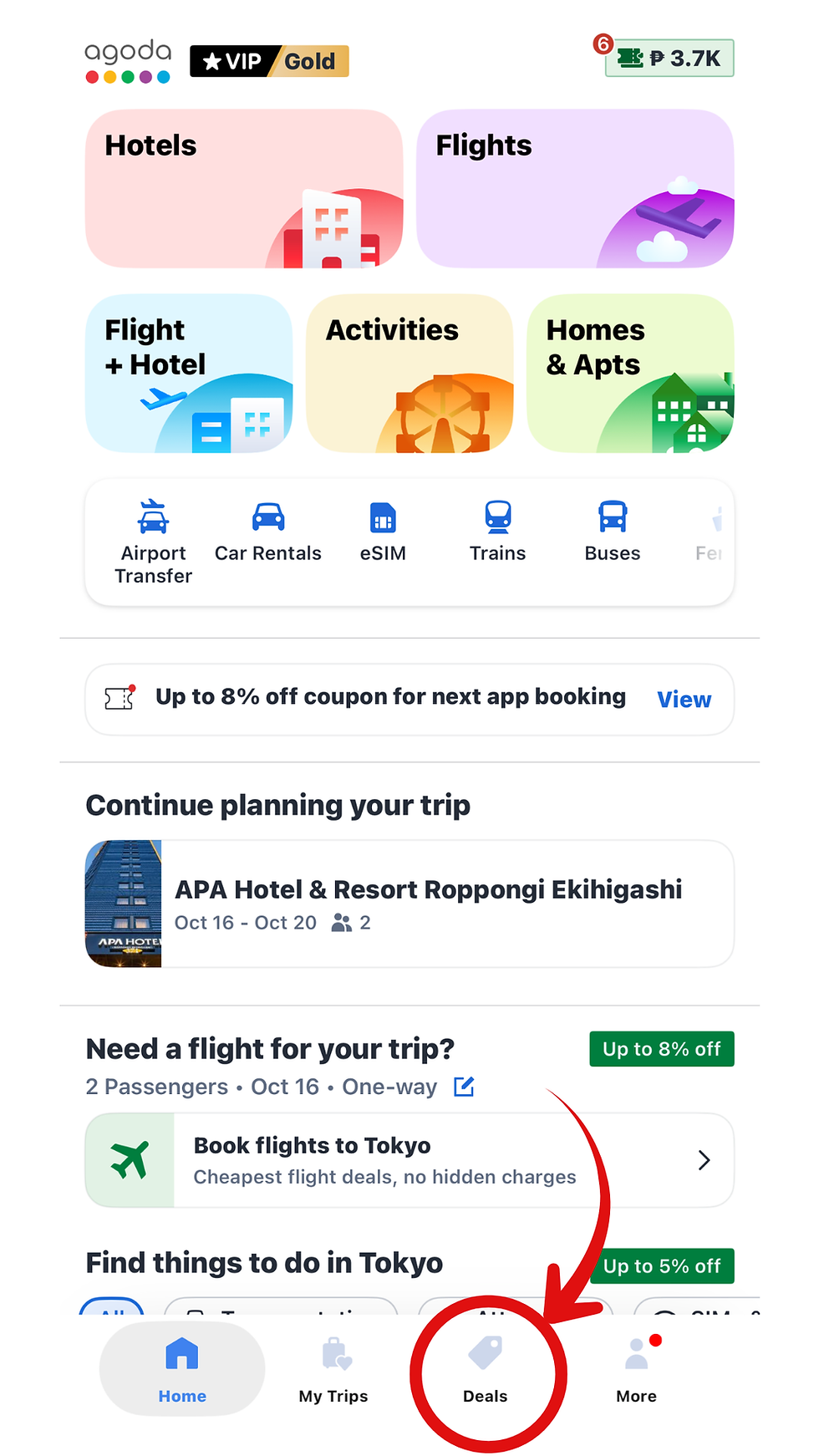
Step 2: Click the Deals Button at the Bottom
Tap the Deals button located at the bottom portion of the app.
Look for the section that says:
“Promo Code” or “Enter Coupon Code”

Input the code:
PVAGODA for hotels and resorts
PVACT for activities and tours
After entering the code, it should appear in your list of coupons. Then tap “Use.”

Step 3: Search for Your Destination
Input your destination, travel dates, number or rooms, and number of guests.
After that, tap Search to view available hotels or activities.

Step 4: Choose Your Hotel or Activity
Browse through the available options and choose the hotel, resort, tour, or activity that you want to book.

Before booking, make sure that the property or activity is eligible for promo code discounts.
Step 5: Proceed to the Booking Page
Once you select your preferred booking, tap Book Now.

You will then be redirected to the booking details page.
Step 6: Enter the Promo Code
Look for the section that says:
“Promo Code” or “Have a Code?”

Input the code again if you don’t see it applied yet. Yes, you may need to enter it again before checkout.
Then tap the "+" sign.
Step 7: Check if the Discount Was Applied
Once applied successfully, you should see the discounted amount reflected in your total bill.
Make sure to double-check the final amount before proceeding with payment.
Step 8: Complete Your Booking
Input your payment details and complete your booking.
That’s it! Enjoy your trip and your Agoda savings. ✈️🌴
Important Reminders
Promo codes may only work on eligible bookings.
Some hotels, resorts, or activities may be excluded from promotions.
Promo codes have limited usage.
Make sure to enter the code before completing your payment.
You may use the codes up to 5 times.
Why We Use Agoda
We personally use Agoda for many of our local and international trips because it’s easy to use and usually offers great deals on hotels and activities.
If you’re planning your next adventure, don’t forget to use our discount codes to save on your bookings.
See you on your next trip! 🌴✈️


Comments